Showing posts with label Nokia. Show all posts

Nokia C2-03 Fix Insert Sim Card Problem (SIM IC jumper Ways)

Here's the solution that may useful to fix the Nokia C2-03 if it does not detect any sim card inserted to it and it only shows "Insert SIM card" even if the sim card is already inserted.
This solution guide shows the connection of both two sim card slot of the Nokia C2-03 since it is built as a dual SIM swapping device. Thank's to GsmAngel for sharing this solution to us.

This solution covers for the side slot SIM card.
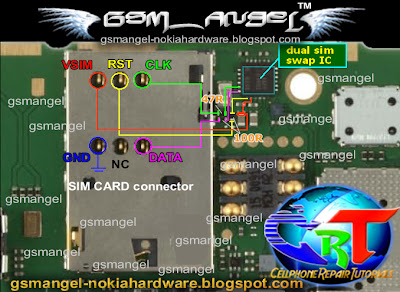
nokia c2-03 sim card IC jumper ways
And this one covers for the SIM card beneath the battery.
nokia c2-03 sim card IC jumper ways
You can follow the step by step troubleshooting procedure here at GsmAngel Solution.

Nokia C3-01 Sevice Hints for Hardware Repair Problems

This is  Nokia C3-01 Service Hints for hardware problems. This is used by mobile phone technician as manual for repairs.

This manual provides the the step by step procedures on how to repair the phone when problem occurred like, display problem, keypad, problem, power problem, not charging problem, display and keypad illumination led problem, bluetooth problem, netwoirk problem.


Download Nokia C3-01 Service Hints

Nokia E5 LCD Screen Display LED Light Problem Solution

Here's the Nokia E5 solution for not working LCD screen display backlight LED problem that result to a black or dark screen display problem. The following repair guide shows the connection of the LCD displays or LCD panel backlight LED.

This may help for quick and easy repair for not working LCD backlight problem. Just ensure that the LCD is not damaged like broken or cracked, for you may need to buy a new LCD display for that matter. Just refer to the solution below if after ensuring that the LCD is still working and only the light won't glow up.

Nokia X2-01 Diassembly/Dismantle Guide

This following manual is a repair manual of Nokia X2-01 mobile phone as a reference for technician or even the cellphone owner to perform proper troubleshoot, service, repair, assembly and disassembly of the cellphone.
Nokia X2-01 repair manual
The contents of the following service manual are including step by step instruction how to properly and safely disassemble, list of parts, required equipment, required software, the whole logic PCB board, power supply, camera, LCD screen display interface module, keypad and backlight LED illumination, keypad interface, silicone rubber keypad and the keypad membrane etc.
Download Nokia X2-01 Diassembly/Dismantle Guide

Nokia E5 Disassembly/Dismantle/Disassemble Guide

If you are looking for a guide on how to dismantle the Nokia E5, you can download it here. This guide is a complete instruction on how to safely dismantle the Nokia E5. This may help if you want to replace a broken or cracked LCD screen display, the silicone rubber keypads and the keypad membrane. Or if you want to clean or repair the phone if some problems occurred like earpiece speaker problem, microphone problem, buzzer problem, not charging problem, headset problem etc.
nokia disassembly repair manual
Note: Disassembling the device will void its warranty, so make sure that you will do this at your own risk.
Download Nokia E5 Disassembly Guide

Nokia C7 Reset Code, format and hard reset procedures

Important: To proceed to reset, the battery must be full and the
mobile device connected to the charger. If during the course of reset,
the mobile stop receiving electricity it can ruin the internal flash
memory of the mobile device and stop function.


Nokia C7-00 reset code
There is one more combination number which can be used for the all Symbian phones. The combination of the numbers of the *#7370# and also the *#7780# can be used for the Hard reset option. This is only used for the Symbian phones and not for any of the phones. The code may or may not full proof but it has yielded better results in many of the Symbian phones and should also work for the C7.

Code to reset the Nokia C7-00
1.- Basic Reset or Soft Reset for nokia C7-00

This option restores the .ini files from the ROM.
Does not erase data (photos, videos, documents) or applications from
a third party. Key Code *# 7780 # (click this combination of keys on the
keyboard in the mobile)
2.- Total Reset or Hard Reset for nokia C7-00

This option restores the original operating system from the ROM.
Formats the C: partition and deletes all data including the memory
card. Key Code *#7370# (click this combination of keys on the keyboard
in the mobile)


How to reset nokia C7-00
The following procedure should be carried out for hard reset of the Nokia C7 phones:

   1. Simultaneously hold the home button, camera button and the volume button.
   2. After that with the same buttons you got to click the power on button until the phone vibrates.
   3. After the procedure is complete release the power on button while still holding the three buttons simultaneously and you got to wait till you hear the nokia sound.

This will hard reset your mobile phone and you got to wait till all the processes are carried out and it will take some time.

However hard resetting can cause you the lose of all the important data that you have in your phone. If you have got a virus related issue then you can try the various virus console that are available in the computers and also try the nokia system's virus console where you get to learn the different virus that can affect the Symbian phone.

If the above steps are not working for your phone then you can contact the Nokia care system support team which will provide you help with all the software related issues. You have an another option that you can contact the retailer regarding the issue and he will surely give you a better view as to how the hard reset can be done on your phone. The hard reset option takes some time so you have to wait until all the set processes are over as it deletes all the files that are present in it and also depends on phone as to how much efficiently it will work.

Nokia C7 Functional Key User's Manual

Here's the Nokia C7 functional key specification and users manual to navigate and use certain keys. This shows all the corresponding Nokia C7 keypad keys and button keys functions like the following:
Left mouse button, Right mouse button, Direction key, Volume Control buttons, Touch pad, the Numeric and QWERTY keyboard keys. 


This also includes, the location of other main functions of  Nokia C7 like, earphone jack, mic, camera, simcard and the receiver speaker, there yo have it, the Nokia C7 functional key .

Nokia C1-00 Not Charging Solution

This solution covers for Nokia C1-00 Charging problem such "charger no response" when the charger is being plug-in to the device. To fix this problem you may refer to the solution below for it shows which particular components needs to check or replace if found damaged or faulty.

nokia C1-00 Not charging  jumper ways repair picture

Repair hints on Nokia C1-00 Not Charging - charger no response problem:
1. Try to use another charger and replace the phones battery.
2. Check the charging pin connector for possible damaged.
3. Clean the charging pin connector PCB's terminal contact pads.
4. Check / replace the fuse and the chip diode.

For "Not Charging" showing on the display ,  try to flash the device firmware again. then do steps above.
If the problem still exist, there must a problem on the Charging or Power IC. reworking or replacing it might only fix your nokia c1-00 not charging problem.

Nokia 5230 MIC Problem Repair Solution

The following solution is for Nokia 5230 MIC(microphone) mouthpiece failure or not working problem. The solution below provides some simple steps on how to fix the the 5230 microphone problem.

Nokia 5230 mic problem jumper ways picture
Repair hints for Nokia 5230 Not working MIC microphone problem:
1. Try restore, the device firmware or flash update to the latest available version.
2. Replace the 5-pin digital microphone.
3. Check the VMIC supply voltage, if already replace but the problem still exists.
4. Check replace the resistors and capacitors.
5. Rework AVILMA IC, replace if necessary, then re-flash the phone again to its firmware version.

Nokia 5230 Send, Menu, End keypad key problem Solution

Here's a hardware repair solution for Nokia 5230 not working upper keypad keys such as the SEND,MENU and END keys problems.This solution provides another way on how to fix if the upper keypad keys don't work.

You may refer to the solution  and follow some step by step procedures below, as like the way how we fix the keypad problem on Nokia 5230 nuron.
 Nokia 5230 Send, Menu, End keys Jumper Solution
Repair hints for Nokia 5230 for not working SEND, MENU and END upper keys:
1. Try to reset, restore or flash update the device firmware to any latest firmware version using your flashing device.
2. Check the pin connector, clean it if necessary.
3. Check the keypad flex matrix for possible damaged, replace if necessary.
4. Check or replace the filter inductors, or coils.
5. Replace the Keypad Filter IC.
6. If the above procedure doesn't fix the problem. you may trace each of the keypad connection line paths down to the filter IC for possible, open circuit.
After that circuit above,  the keypad connection line paths goes through to the CPU, The CPU IC will be your next target of suspected components if all of the above solution doesn't fix your nokia 5230 keypad problem.

Nokia 5230 keypad Light Problem Jumper Solution

This solution covers for Nokia 5230 nuron with not working keypad light problem. The solution below shows the connection line paths of the keypad LED such as the SEND, MENU and END keypad light LED's.

Just refer to the given solution below and follow some step by step procedure on how to fix the problem.

5230 keypad backlight jumper repair picture
Repair hints for Nokia 5230 not working upper keypad light LED.
1. Try to flash update the device firmware first.
2. Check the upper key flex connector for possible damaged, replace if necessary.
3. Check or replace the keypad LED's.
4. Check the keypad pin connector, clean it if necessary.
4. Check the particular filter coil in each keypad LED's. replace if found damaged.

Nokia 5230 Headset MIC and Earpiece Problem Repair Solution

Here's the solution for  Nokia 5230 Nuron that deals with headset problem like, not working headset microphone and earpiece speaker, Earpiece device not detected when being plug-in or connected and also headset activated mode problem.

Refer the headset problem solution  and follow some repair guides below, on how to fix the problem.

Nokia 5230 Headset  Problem repair picture guide
Repair hints for Nokia 5230 headset problems:

Nokia 5230 Headset MIC not working:
1. Try to use another working headset.
2. Check the plug connector for possible damaged.
2. Check /replace the MIC filter coil.
4. Replace the audio IC.

Nokia 5230 Headset Earpiece not working:
1. Try to use another working headset.
2. Check the plug connector for possible damaged.
2. Check /replace the earpiece filter coil and chip.
4. Replace the audio IC.

Nokia 5230 headset device not detected or recognize:
1. Try to use another working headset.
2. Check the plug connector for possible damaged.
2. Check /replace the headset detect 10K resistor.
4. Restore /flash update the device firmware.

Nokia 5230 headset in activated mode, headset icon keep on showing on the display:
1. Try to flash update the device firmware to the latest available version.
2. Check, the headset connector for possible damaged.
3. Check /replace the headset detect 10K resistor and the capacitor. 
4. Check /replace the switching IC. 

Nokia 5230 Solution for Not Working Earpiece Speaker Problem

This covers for Nokia 5230 solution for Earpiece Speaker problem. The solution provides some simple repair hints and also shows the connection line paths of the receiver speaker for easy troubleshooting.

If encountered a try to fix the Nokia 5230 Earpiece speaker problem just follow some step by step instruction below.
Nokia 5230 earpiece speaker jumper ways
Repair hints on how to fix the Nokia 5230 Not Working Earpiece Speaker:
step 1. Check and try to replace the Receiver Speaker.
step 2. Clean the Earpiece Speaker terminal contact pads.
step 3. Check the filter coils and the ESD protection diodes, replace it if  already damaged.
step 5. Trace the connection of the each terminal contact pads down to the each filter coils where it is being connected.
step 6. If  all of the above procedures does not fix the problem. Try to flash update the device firmware to any latest file version.
step 7. In this level you may need to rework or replace the AVILMA IC and re-flash update the device firmware again.

Nokia 5230 Blank White, Blue Screen Display Problem Jumper Ways Solution

This solution covers for Nokia 5230 Nuron LCD display problem such as white screen, blank or black scree, blue screen, garbled or saturated screen displays.

The solution below shows the connection line paths of the LCD display circuit. You may then refer to that solution for further troubleshooting, but before that just follow some hints on how to fix the display problem as hereby indicated below.

Nokia 5230 Display Problem Jumper ways tracks picture
Repair hints on How to fix the  Nokia 5230 Display Problem:
step 1. First try to replace the LCD screen module, check and clean the LCD pin connector.
step 2. Try to flash update the device flash firmware to any latest available version.
step 3. Check the LCD supply voltages, also check the filter coil and capacitor, replace if found damaged.
step 4. Replace the Display EMI/ESD Filter IC.
step 5. Rework, replace the Display controller IC.
step 6. If you get into this level, you may need to rework or replace the RAPIDO IC and flash update the device again.

Nokia 5230 Display Light Problem Jumper Ways Solution

If encountered a display light problem of Nokia 5230 that shows a dark screen display, here we show you the connection line paths of the Display light circuit and prefered some simple instruction on how to fix it.
Refer to the solution and follow some simple step by step instruction below.
Nokia 5230 Display Light Jumper ways tracks
Repair hints for Nokia 5230 Dark Screen Display with not working LED light problem:
1. Try to replace the LCD module, to confirm if the LED light were still working or not.
    If the problem still exists follow the steps below.
2. Check the LCD pin connector for possible damaged, clean it, then replace if necessary.
3. Trace the two supply voltage that feeds from the resistors down to the pin connector.
4. Check also the connected resistors, replace if found damaged.
5. If the keypad LED also does not light up, te problem may possibly lies on faulty LED driver IC.
6. Check the inductor coil, and also read the 3.8 volts battery supply voltage.
7. If the voltage is okay and the inductor coil is still working,.. Replace the LED Driver IC.

Nokia 5230 Volume Up, Volume Down Button Switch Jumper Ways Solution

Here's the jumper solution for Nokia 5230 Volume up and down button switch. This solution shows the connection line paths of the 5230 Volume control switches.

You may refer to the solution if encountered and try to fix a not working volume switch.
nokia 5230 Volume control switch jumper ways
The volume control switches is connected directly to the keypad filter IC, you may need to replace the keypad filter IC if the said volume switches is not working or responding.

Nokia 5230 Camera Button Switch Jumper Ways Solution

If you are looking for the solution for not working camera button switch  of Nokia 5230, this solution shows the connection line paths of it. This may also helpful for damaged or lifted camera switch solder pads.


nokia 5230 Camera switch jumper ways
Like the volume up and down switch, the camera switch is also connected to the keypad filter IC , so therefore you may need to replace the, the filter IC if the camera switch stop working or responding.

Nokia 5230 Nuron Charger Not Supported Problem Solution

This is another solution for Nokia 5230 with charger not supported problem. This solution shows the mostly main components that may result to charger not supported if being damaged.

To fix the problem, you may first try to use another working charger and replace the phones battery, if the problem still persists, locate the highlighted components on the PCB board, and then try to replace it.
nokia 5230 charger not supported repair picture
On the solution above shows the BTEMP (battery temperature) 47k resistor, that may need to replace if the device shows "charger not supported when the charger is plug-in or inserted.

Nokia 5230 Not Charging Problem Solution

This shows the Nokia 5230 solution for not charging problem such as "charger no response or shows no indication when the battery charger is inserted or plug-in". the solution below shows the connection line paths of the 5230 charging circuit which is useful in troubleshooting the not charging problem issues.

You may locate the highlighted components and do some test and check up procedures, then follow some some step by step instruction below.

Nokia 5230 Not Charging Problem Solution for Repair
Nokia 5230 charge jumper ways
Repair hints on Nokia 5230 Not charging problem:
1. Try to use another working charger and battery.
2. Check the charging pin connector for posibble damaged. Replace if found so.
3. Clean the charging pin connector contact pads and trace its connection down to the fuse and ground lines.
4. Check the fuse if already busted or blown out, check the diode if shorted, a shorted diode make the fuse blown up again.
5. Check, clean the battery terminals.
6. Rework the Betty IC, if the fuse, diode, and inductor coil is okay. Just replace if necessary.
That's it... 

Nokia 5230 Camera Hardware Operation Failure Problem Solution

This is a Nokia 5230 Nuron solution for not working camera or shows errors when the camera opened or used. This may help fixing the device after confirming or already flash, update or restore the flash firmware but nothing happens.

Here we show some hints on how to fix the Nokia 5230 with camera problem issues that can not be fix by software calibration. Just refer to the solution below and locate the highlighted components on the 5230 PCB board.
Nokia 5230 camera problem solution
Nokia 5230 Camera problem repair solution
Some step by step Repair hints for Nokia 5230 camera failure problem:
1. Remove the camera module, check and clean the camera slot for possible damaged and oxidation build up,
then in-place it back or try to replace with a new one. 
2. Check all the camera supply voltages, such VCAM 1.8V, 2.8V and 1.3V on the capacitors pointed. If this this voltages is missing check the battery supply voltage of 3.8V to each of those DC regulator IC's.
3. If the battery supply is okay, replace the regulator IC that has no supply voltage output reads.
4. If all the supply voltages and the camera module is confirmed okay, there is a possibility that the problem lies on camera controller IC.
5. Reheat, rework or replace the Camera IC if necessary.
That's it, hope this help..