Showing posts with label Nokia 1508 Solution. Show all posts

Nokia 1508 White and Blue Screen Display Solution

This covers to fix the the Nokia 1508 display problem such as white screen, blue screen, saturated and garbled screen displays. This solution can be used if the LCD replacement and firmware update does not solved the problem.
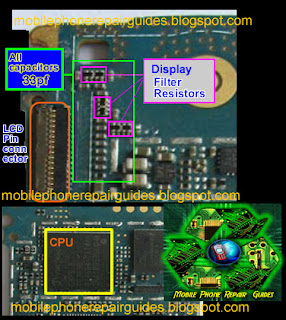
nokia 1508 Display connector jumper ways tracks
You may check or replace the highlighted components above. This components is were the display also connected.

Nokia 1508 Display Light Solution

This solution can help fix Nokia 1508 with Display LED light not glowing and shows a dark or black screen display problem. In order to fix the problem you may first confirm that LCD LED light is working after trying replacing the LCD with a new one.


You may just check the highlighted components and trace the connection of the LCD backlight LED supply voltages.

Nokia 1508 Inser SIM card error Jumper Solution

Here's the Nokia 1508 Insert SIM card problem Solution, to help fix if the device wont detect or accept any SIM card inserted to it.

nokia 1508 Sim card jumper ways
You may just trace each of the pin connection through to the SIM filter IC and then check all the corresponding components associated with the SIM connection. Just replace the component if found damaged.

Nokia 1508 Full keypad Jumper Solution

This is the Nokia 1508 keypad Jumper Solution that may help fix and repair a not working keypad keys problem.You may just refer the solution below to trace a ceratin keys that doesn't work or responding when being pressed.
nokia 1508 full keypad Jumper ways
All the keypad keys is connected directly to the Main IC and there is no any filtering components is being used.

Nokia 1508 Keypad Light Jumper Solution

This repair guide may help fix Nokia 1508 keypad light not glowing or not working problem.
To fix the keypad light you may first check the two keypad LED's then trace its connection line paths through the components where it is being connected.

nokia 1508 keypad light not glowing repair picture help
There is a 3.8 volts supply voltage to the LED, read it using a multimeter, if the two LED is working okay.
The filter resistor is connected  to negative supply voltage of the keypad LED light. check it also.
If the procedure above does not solved the problem. You may then try to rework or replace the LED driver IC. Hope this help and serve as Nokia 1508 Keypad light problem solution.

Nokia 1508 Ringer Speaker Jumper Solution

Here's the Nokia 1508 Ringer Speaker Jumper Solution to fix a not working hands free speaker problem. You may use the solution below after confirming that the speaker is working okay but no rengtone or unable to heard a sound when the loudspeaker of the Nokia 1508 is activated.

nokia 1508 riger speaker jumper ways tracks
You may just trace its connection line paths, then check or replace the components such as the filter coils and the Audio Driver IC. This procedure may help fix the Nokia 1508 Ringer or Hands Free Speaker problem.

Nokia 1508 Earpiece Speaker Jumper Ways Repair Solution

Here's the Nokia 1508 Earpiece speaker jumper solution that can be used to troubleshoot the device after changing the speaker but it doesn't have an audio sound can be heard on it when a call is made.

Just refer to the solution below and then check the earpiece speaker line tracks.
From the Earpiece speaker terminal contact pads, trace each corresponding connection down to the ESD protection diode filter coils. Then check the components and replace if found damaged.

Nokia 1508 Mic problem - Jumper ways solution

This solution covers to fix Nokia 1508 Mic problem, or if the mouthpiece microphone failure occurred.
You may use the solution below as aguide to check and trace the mic components and connection line paths.

nokia 1508 Mic Jumper ways
 You may first check the MIC module or try replacing it with a new one.
There is  a filter coils and capacitors on Nokia 1508 mic circuit being used. Check all of these and replace if found damaged.

Nokia 1508 USB Not Charging Solution

Here's the Nokia 1508 Chrging Ways solution line paths, to fix if the phone won't charge if the USB charger is plug-in.


You may just check each components and connection line paths and then replace if found damaged or faulty.

Nokia 1508 Power ON OFF Button Key Jumper Ways Tracks

This solution covers to fix Nokia 1508 Power On-OFF button key that doesn't work or responding and the device shows battery charging indication if the battery charger is plug-in.

In order to fix the power On OF key malfunction, you may first clean the Keypad Board for if there is an oxidation build up found.


nokia 1508 power off key jumper ways
Then trace the connection of the power key as shown on the solution, above, just apply a jumper wire to it if the connection is open or cut-off.

Nokia 1508 Solution for Hardware Problem

This solution covers on Nokia 1508 and 1508i hardware repair guide like the following hardware problems:
all nokia 1508 repairing picture help

Nokia 1508 Display Light Solution
Nokia 1508 Display problem Solution
Nokia 1508 eapiece solution
Nokia 1508 insert sim card ways solution
Nokia 1508 keypad jumper ways
Nokia 1508 keypad Light Solution
nokia 1508 mic solution
Nokia 1508 power key jumper ways
Nokia 1508 ringer IHF speaker solution
Nokia 1508 usb charge ways